

14·
7 months agoMy kid calls it an “upper decker”
Please correct my English.
The Lemming formerly known as /u/SatyrSack@lemmy.one
My kid calls it an “upper decker”
Are these fishers in danger?

Agree. For things like semantic versioning, in which “1.20.1” and “1.2.1” are two different things, you want to pronounce them “one point twenty point one” and “one point two point one”, respectively. But that is a bit of an outlier. File size should be pronounced “normally”, because “1.20” and “1.2” are the same value.
A Linux user running random commands to add a new repo that points to malware (their package manager does not have the program they want by default)
Note: I just did this to install Librewolf, Mullvad, and VS Codium
Ahh here we go: it’s a user made setting not a bluesky one
“Sign-in Required This user has requested that their content only be shown to signed-in users. This label was applied by the author.”
Why would a user choose to enable that? Would that make it less likely to be scraped by a bot?
PCs were just better for businesses at the time.
How so?
Me when I realize the more I use Termux, the better I get at using Debian
Maybe this was not supposed to have been posted until April fool’s day. Silly Zorin was too early for the joke.


Works on Termux: pkg install hollywood. Best in landscape, but does work in portrait.
What keyboard do you use? Do you need something like Unexpected Keyboard, or are you still able to be productive in vim with a more “standard” Android keyboard?
HTML predates XML by several years.

Kongratulations
*KOOL

The Internet is a series of sewer pipes
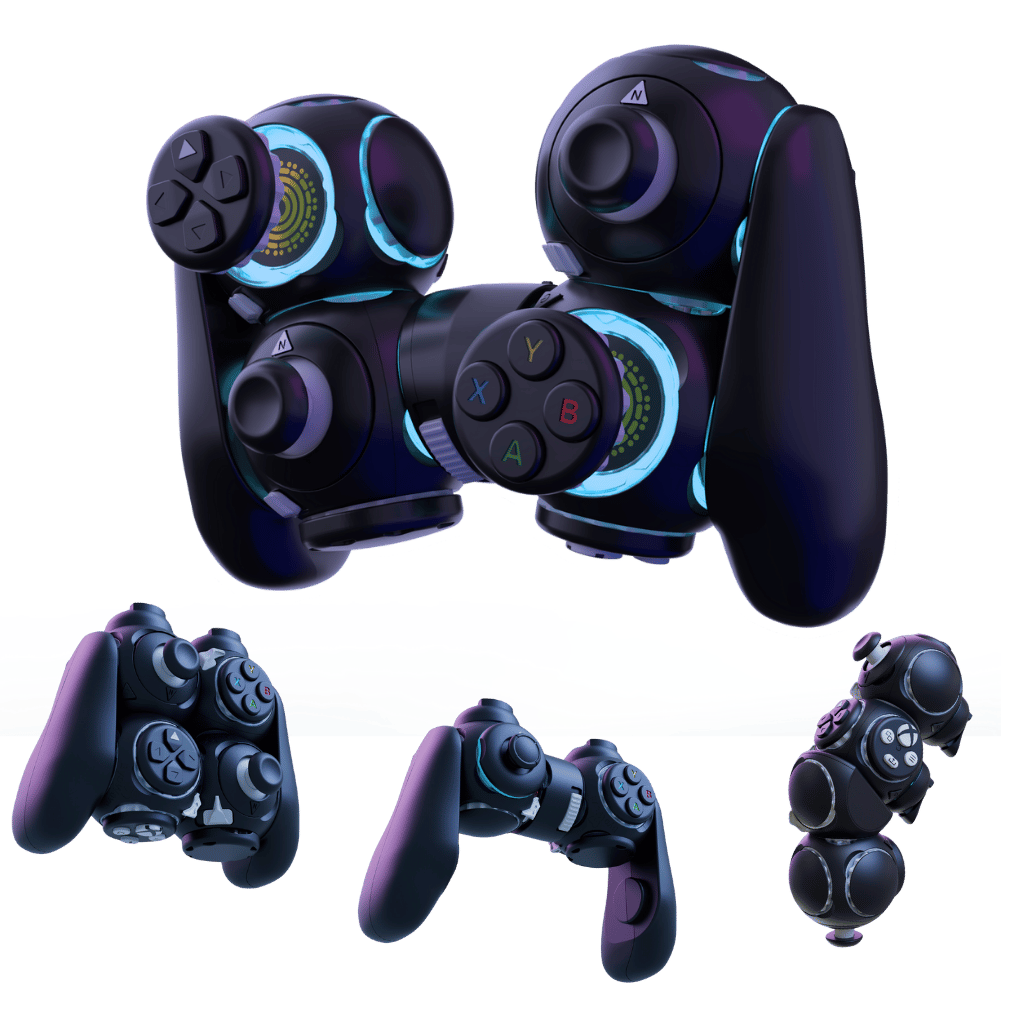
Add support for the Proteus Byowave controller
That sure looks like an interesting device, but I cannot imagine that being worth the €300 for anyone. I would expect that even someone who really needs a far-from-standard controller for accessibility reasons could find a better (albeit less reconfigurable) option to suit their needs.
General
- Updated to a newer Arch Linux base
- Updated the Linux kernel to 6.11
- Updated the Mesa graphics driver base
- Desktop mode now ships with Plasma 6.2.5
- Beginnings of support for non-Steam Deck handhelds
Controllers and Input
- Add support for the Proteus Byowave controller
- Fixed an issue where Switch Pro Controller gyros might not work on first connection
- Fixed an issue with stuck/hanging controller inputs when exiting Steam
Bluetooth
- Fixed Bluetooth devices still being able to wake the Steam Deck from suspend, even when Bluetooth was disabled from Desktop mode
- Enable HFP/HSP profiles, to allow using the integrated microphone from headsets and earbuds
- Currently only available to select in Desktop mode
- Added battery level display for supported Bluetooth devices
- Include a bugfix for the Airpods when using the AAC codec
- Bluetooth controllers can now wake LCD units from sleep, previously only available on OLED models
- Known issue: Bluetooth LE based controllers are not currently compatible with bluetooth wake on LCD models
Steam Deck Dock
- Made compatibility improvements for certain displays including TCL FireTV models and Dell VRR capable monitors
Graphics and Performance
- Enabled AMD P-State CPU frequency control
- Fixed a performance regression for No Rest for the Wicked
Desktop
- Updated to Plasma 6.2.5 (previously 5.27.10) - see the big changes in Plasma 6 here
- Surround sound now works correctly
- Enabling the setting is currently only available via Desktop mode
- KDE Filelight is now installed by default for disk usage visualization and low disk space notifications
- Speed and robustness improvements when switching between desktop and game mode
- Fixed a common cause of hangs when switching to desktop mode
- Fixed some cases where Steam could take up to ninety seconds to exit on shutdown or switch to desktop
- Added ‘gocryptfs’ support to desktop session to enable use of the Plasma Vaults feature
Misc
- Fixed some cases where “filter-chain” or other virtual sound devices would erroneously appear in the UI
- Fixed cases where applying system updates could fail if certain configuration files were corrupted or malformed
- Various enhancements to System Report functionality for support and troubleshooting
- Fixed compatibility issue with certain DNS servers causing very slow domain lookups
- Improved responsiveness of system when running into out-of-memory crash situations
- Enabled IPv6 Privacy Extensions by default
Known Issues
- Creative Zen Air Pro earbuds display an unexpected all-zeros entry under the “Show all devices” section when pairing
- Super NES controllers can erroneously show up as connected when they are not
- DualShock 3 controllers are currently not able to be paired or used
Developer
- Updated to a 6.11 based kernel
- Added debuginfod URLs for SteamOS
- Added systemd .socket units to the default list of /etc files preserved across updates
- When running in a VM, system will now default to the desktop session
- Swap file setup now uses standard ‘mkswap’ functionality instead of shipping an ad-hoc ‘mkswapfile’ script
- The steamos-readonly command now warns that the status might not be accurate when sysexts are loaded
- Fixed a case that could introduce duplicate boot entries for devices manually setup to dual-boot
- The pacman cache is now cleaned after applying a SteamOS update
- Fixes stale cache errors working with pacman after switching branches


If someone is just using a solid color as as a PC wallpaper, there is likely not a “file” to transfer. When using a solid color in the wallpaper settings, desktop environments provide a color picker instead of a file picker.